Intelligent Service Side Caching

Our LiteSpeed Server Side Caching vs. other popular WordPress caching plugin/systems.
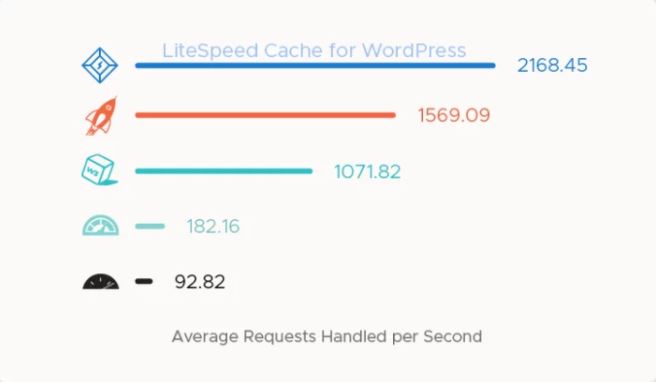
WPCloud server-side caching is what many consider to be the highest performance & certainly the most feature packed WordPress caching system available.
By default, our caching system is perfectly set up for normal everyday WordPress operations. For example, when a page/post is edited, a new page created, plugin added/updated, comment approved, etc – the cache will automatically purge. You can also easily purge a specific page, or the entire caching in one click from the WordPress admin bar. The caching dashboard also allows quick access to TTLs, purge settings, page exceptions & many more features. ✔
The extend-ability & functionality of the caching system is extensive, we provide full details to our clients via our knowledge. Here is an overview of some of the major features. ✔
Server-Side Full-Page Cache
True server-side caching creates & stores static copies of your WordPress dynamically-generated web pages. Static copies are then stored & served from a hybrid of memory & nvMe disk, which results in extremely fast page load times. ✔
Functionality to cache multiple versions of content, based on factors such as browser agent, geography & even currency. ✔
Fully compatible with WooCommerce. ✔
Private Cache
Private caching provides the ability to cache personalized copies of a page, in situations where the content is pertinent only to the user who requests it. ✔
Caching can be extended to include logged-in users. ✔
Edge Side Includes (ESI)
ESI lets you “punch holes” in a cached page, and then fill those holes with differently-cached content. ✔
Large sites with rarely-changing content can be cached longer while punching holes for more frequently-changing widgets. ✔
Entire pages need not be cached privately if a hole can be punched for a personalized greeting or a shopping cart, which is the default setup for our WooCommerce caching. ✔
Optimization Features
We have taken the functionality of what most WordPress sites need 3 plugins to accomplish & put them all server side, with no overhead or bloated plugins within your site setup. ✔
Image Optimization
Lossless optimization reduces file size without impacting image quality, resulting in improved page load times. ✔
full restore functionality, individual images may be reverted back to their original formats if required. ✔
WebP file conversion – WebP is a modern image format developed by Google. WebP image files are an average of 26% smaller than optimized jpeg or png file formats.
CSS/JavaScript/HTML Minification ✔
Removes all unnecessary whitespace characters, newline characters, and comments from CSS, JavaScript, or HTML code
fully customizable. enable only the minification functions you need.✔
Reduces the size of the source code, making it more efficient to transmit over networks.
CSS/JavaScript Combination
Combines multiple JavaScript or CSS files into one file.
Again, fully customizable, enable only the combination functions you need. ✔ Reduces the number of requests made by the browser and potentially removes duplicate code, both of which translate to improvements in speed. ✔
Browser Cache Support
Facilitates storing static content locally on the user’s device. Content is pulled from the device’s local storage until the browser cache expires. ✔
Simple ON/OFF button. No complicated setup.
No editing .htaccess files, our system takes care of that for you, including backing up htaccess before changes are saved. ✔
Eliminates the need for a separate Browser Cache plugin. ✔
Browser cache usage speeds up your site. No matter how fast the connection, displaying a local image will always use fewer resources than transferring an image across the internet. ✔
HTTP/2 Push
Anticipates the browser’s needs and acts upon them without waiting for a separate request. ✔
Reduces the number of requests necessary when loading a web page. ✔
Lazy Load Images
Loads images and iframes asynchronously.
Saves time by loading only that media necessary to fill the current viewport.
Load remaining images and iframes on an as-needed basis. ✔
Database Optimization
Keeps the WordPress database slim, trim, and as efficient as possible. ✔
Speeds up database queries by eliminating the clutter that accumulates over time. ✔
Eliminates the need for a separate database optimization plugin. ✔
See Plans
